Hook
If your team manages Snowflake query logic in GitHub but has to manually paste connector settings into Domo every time something changes, you already know the problem — it doesn't scale and it breaks.
Why It Matters
Domo connectors aren't just a UI concern — their configuration lives in an API-accessible object called a Stream, separate from the Dataset itself. Without understanding that distinction, you can't automate anything. Once you do, you can drive connector configuration from a source-of-truth in GitHub, eliminate manual copy-paste across 17+ fields, and wire connector updates into your existing CI/CD workflows using Python and the domolibrary package.
What You'll Learn
- Understand why a Domo Dataset and a Stream are separate objects — and why that matters for automation
- Inspect live API traffic in Domo to identify the Stream endpoint and its configuration payload
- Use
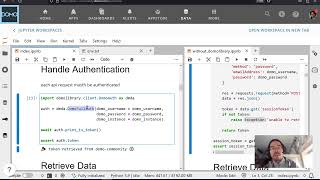
domolibraryto read and update connector configuration via the Domo API - Design a pattern for pulling config from GitHub and applying it to a Domo connector programmatically
Dataset vs. Stream: The API Distinction That Unlocks Automation
The key conceptual unlock here is that Domo separates what the data looks like from how it gets there. The Dataset object holds schema metadata — column names, types, row counts. The Stream object holds the connector configuration — credentials, query text, schedule, and data provider settings like your Snowflake SQL.
Jay demonstrates this by opening browser DevTools on a Domo dataset and monitoring network traffic. A GET request to the dataset endpoint returns schema info and confirms the data provider type (e.g., json, snowflake), but no connector config. The Stream endpoint — discoverable by filtering requests for stream — is where the actual connector payload lives.
With that payload identified, the automation pattern becomes straightforward:
- Read the current Stream configuration via the Domo API
- Fetch the desired configuration (e.g., a SQL query or JSON config block) from a GitHub repo
- Diff and update the Stream payload using
domolibrary
The domolibrary Python package wraps the Domo API and handles auth, making it practical to drop this into a script or GitHub Action. The same approach generalizes beyond Snowflake — any JSON-configured NoCode connector in Domo exposes its settings through the Stream API and can be updated the same way.
This is the foundation for treating Domo connector configuration as code: version it, review it in PRs, and deploy it automatically.