Hook
Managing 400+ Domo Magic ETLs by hand isn't a workflow — it's a sentence. When Domo released canvas grid lines as a visual setting, the only problem was there was no built-in way to enable it across every dataflow at once.
Why It Matters
Without a programmatic approach, enabling the new canvas grid/dot background on each ETL requires opening every dataflow individually and toggling the setting by hand. For teams managing large Domo instances with hundreds of dataflows, that's not just tedious — it's a maintenance pattern that doesn't scale. This approach lets you write it once and run it against every dataflow in your instance, or filter to just the ones you own. It also establishes a repeatable pattern for any future bulk dataflow configuration changes.
What You'll Learn
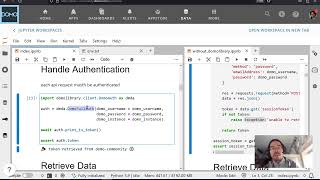
- Authenticate against a Domo instance using a
DomoAuthobject from DomoLibrary - Retrieve and filter all dataflows in an instance by owner ID
- Inspect and modify the canvas settings payload on a dataflow object
- Batch-update Magic ETL visual settings via the Domo API using Python
- Structure a reusable Jupyter notebook for bulk Domo administration tasks
Bulk-Updating Dataflow Canvas Settings with DomoLibrary
The core pattern here is straightforward: authenticate, retrieve, filter, mutate, push. Jay uses the DomoDataflow module from DomoLibrary to pull every dataflow in the instance — all 400+ of them in this case. Because modifying every dataflow blindly is risky in a shared environment, the script filters by owner user ID before touching anything.
Once you have a filtered list, the canvas settings live inside the dataflow's configuration payload. The grid line variants (dots, crosses) correspond to specific property keys that you can set programmatically — the notebook walks through exactly which fields to target and what values to pass.
A key design decision worth noting: rather than using Code Engine (which Bryce's community solution relied on and which handles auth under the covers), Jay opts for explicit DomoAuth object instantiation. This matters when you're working across multiple Domo instances — the same script can authenticate against any instance by swapping credentials, which is exactly the use case for teams managing 100+ Domo deployments.
The full working notebook is available on GitHub, and the DomoLibrary documentation covers the DomoDataflow module in detail if you want to extend this pattern to other bulk configuration tasks.