Hook
Your Domo instance has hundreds of datasets with inconsistent names and no tags — and manually tagging them one by one in the UI is not a strategy, it's a weekend you'll never get back.
Why It Matters
Without consistent tagging, dataset discoverability collapses as your Domo instance scales. Analysts waste time hunting for the right dataset, governance becomes guesswork, and onboarding new users means giving them a tour instead of a taxonomy. Automating tagging with Python means you can enforce naming conventions programmatically, run it on a schedule, and version-control your logic — turning a one-time cleanup into a repeatable governance layer.
What You'll Learn
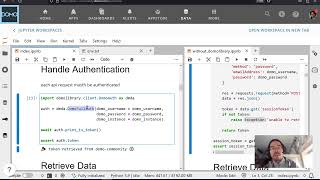
- Authenticate against the Domo API using the
domolibraryPython library - Query and filter datasets by metadata attributes at scale
- Apply tags programmatically across datasets matching a given criteria
- Run the entire workflow from GitHub Codespaces with no local setup
- Understand when to use the scripted approach vs. Domo's built-in Governance Toolkit
Automating Dataset Governance with domolibrary and GitHub Codespaces
The workflow centers on domolibrary, an open-source Python library that wraps the Domo API and is hosted freely on GitHub Pages. Rather than clicking through the Data Center UI, you define tagging logic in code — pulling a list of datasets, filtering by name patterns or owner, and bulk-applying tags in a loop.
GitHub Codespaces handles the runtime environment, which removes the friction of local Python setup entirely. You open the repo, launch a Codespace, and run the script — useful if you're demoing this to a team or handing it off without worrying about environment parity.
The core pattern is straightforward: authenticate with your Domo client credentials, retrieve datasets via the API, apply conditional logic (e.g., tag anything with "Salesforce" in the name with crm and salesforce), and push the updated metadata back. The library abstracts the raw API calls so the script stays readable even if you're not deep in the Domo API docs.
One key decision point: if you don't want to maintain a script, Domo's Governance Toolkit includes a DatasetTagging tool that covers common cases through the UI. The scripted approach wins when you need custom logic, scheduled execution, or integration with an existing data ops pipeline. For ad-hoc cleanup, the Toolkit is often enough.
The inspiration for this video — John Le's Domopalooza 2023 session on treating data like a clean kitchen — is worth keeping in mind: tags are only useful if the convention behind them is enforced consistently. The script is the enforcement mechanism.